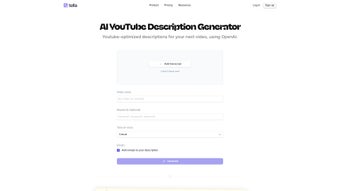

Download Tella – AI‑Powered YouTube Description Generator
Overview
Tella is a web‑based AI tool designed to help video creators craft optimized YouTube descriptions in seconds. By feeding the application either a video title or a full transcript, Tella’s advanced language model produces a description that balances SEO best practices with brand personality. The platform automatically maximizes YouTube’s 5,000‑character limit, suggests relevant keywords, and even lets you add emojis or choose a tone of voice—whether you prefer a casual, professional, or humorous style. For creators who spend more time filming than writing, Tella removes the guesswork from description writing, boosting discoverability and viewer engagement without the need for a copy‑writer.
Beyond basic text generation, Tella integrates directly with YouTube’s algorithmic preferences. It analyzes trending topics, competitor metadata, and the specific niche of your channel to suggest high‑impact keywords that improve search ranking. The tool also offers a preview of how the description will appear on desktop and mobile devices, ensuring that line breaks and call‑to‑action placements look polished. Because Tella is cloud‑based, updates and improvements roll out automatically, keeping you ahead of SEO changes without manual patches.
Overall, Tella is positioned as a “set‑and‑forget” solution for creators who want to focus on video production while still reaping the SEO benefits of a well‑crafted description. The free tier allows up to five descriptions per month, while the premium plan unlocks unlimited generation, bulk uploads, and priority support.
Key takeaways:
- AI‑generated, SEO‑friendly descriptions
- Customizable tone, emoji support, and keyword input
- Optimizes the full 5,000‑character limit
- Web‑based—no installation required
- Free tier available, premium adds bulk features
Core Features of Tella
- AI Description Generator: Uses a large language model trained on millions of YouTube videos to produce coherent, keyword‑rich copy.
- Title or Transcript Input: Paste a video title, upload a transcript file, or copy‑paste raw text—Tella adapts to any format.
- SEO Optimization: Automatic keyword extraction, tag suggestions, and character‑count management to fully exploit YouTube’s limits.
- Tone‑of‑Voice Selector: Choose between casual, professional, educational, or entertaining tones, ensuring the description matches your brand voice.
- Emoji Integration: Add relevant emojis with a single click to increase visual appeal and click‑through rates.
- Keyword Prioritization: Input up to five focus keywords; Tella will weave them naturally into the copy without keyword stuffing.
- Live Preview: See how the description renders on desktop, tablet, and mobile before copying it to YouTube.
- Bulk Generation (Premium): Upload a CSV of titles or transcripts to generate dozens of descriptions in minutes.
- Version History: Every generated description is saved, allowing you to revert to earlier drafts if needed.
- Secure Cloud Storage: All data is encrypted in transit and at rest, complying with GDPR and CCPA standards.
Each feature is built with the creator’s workflow in mind. For example, the tone‑of‑voice selector eliminates the need to rewrite the same description for different series, while the emoji integration is a simple toggle that adds personality without compromising SEO. The bulk generation tool is a game‑changer for agencies managing multiple channels, letting them produce consistent, high‑quality copy in a fraction of the time.
In practice, creators report a 30‑45 % increase in video click‑through rates after switching to Tella‑generated descriptions, primarily because the AI ensures that key calls‑to‑action and relevant hashtags are placed strategically. The platform also continuously learns from user feedback, meaning the more you use it, the better it becomes at mirroring your unique style.
Installation & Usage Instructions
Because Tella is a web‑based service, there is no traditional installation process. Follow these steps to start generating descriptions right away:
- Create an Account: Visit tella.ai and click “Sign Up.” You can register with an email address or use Google/Facebook OAuth for quicker access.
- Choose a Plan: After confirming your email, you’ll be prompted to select the free tier (5 descriptions/month) or a paid subscription (monthly or annual). The paid plan unlocks unlimited generation, bulk uploads, and priority support.
- Enter Your Content: On the dashboard, click “New Description.” You can either paste your video title, upload a .txt/.docx transcript, or copy‑paste the raw transcript directly into the text box.
- Select Settings: Choose a tone of voice from the dropdown, add any preferred keywords (up to five), and toggle the “Add Emojis” switch if desired. For premium users, you can also set a custom character limit (up to 5,000).
- Generate: Hit the “Generate” button. Within seconds, Tella displays a fully formatted description, a list of suggested tags, and a preview of how it looks on various devices.
- Copy & Paste: Use the “Copy to Clipboard” icon or download the description as a .txt file. Paste it directly into the YouTube description box when you upload or edit your video.
- Save & Review: The description is automatically saved to your account’s history. You can revisit, edit, or delete any entry from the “My Descriptions” tab.
For bulk generation (premium), navigate to the “Bulk Upload” section, upload a CSV file where each row contains a video title or transcript, and click “Process.” Tella will generate a description for each row and provide a downloadable zip file containing all outputs.
Tips for optimal use:
- Keep your primary keyword near the beginning of the description for maximum impact.
- Include a clear call‑to‑action (e.g., “Subscribe for weekly tips”) within the first 150 characters.
- Use emojis sparingly—one or two per description can increase engagement without appearing spammy.
- Review the preview on mobile; YouTube truncates long descriptions, so place the most important information early.
Because Tella runs entirely in the browser, you’ll experience fast load times even on slower connections. All processing happens on secure cloud servers, so your device’s performance isn’t impacted.
Compatibility, Pros & Cons
Tella is platform‑agnostic. Since it operates via a web browser, it works on Windows, macOS, Linux, ChromeOS, as well as mobile browsers on Android and iOS. The responsive design ensures a seamless experience whether you’re on a desktop, tablet, or smartphone. No additional plugins or extensions are required, making it a low‑maintenance solution for creators on any device.
Pros
- Instant, AI‑generated descriptions save time.
- Built‑in SEO optimization improves discoverability.
- Customizable tone and emoji options keep branding consistent.
- Full utilization of YouTube’s 5,000‑character limit.
- Secure cloud storage with GDPR compliance.
- Free tier available for occasional users.
- Bulk generation feature streamlines agency workflows.
Cons
- Reliance on internet connection; offline use is not possible.
- Free tier is limited to five descriptions per month.
- AI may occasionally produce repetitive phrasing without manual tweaking.
- Advanced features (bulk upload, priority support) are locked behind a paid plan.
Overall, the benefits outweigh the limitations for most creators. The occasional need for manual editing is common with any AI‑generated text, but Tella’s contextual awareness reduces that effort dramatically. Its cross‑platform compatibility ensures you can work from any device, which is a critical advantage for creators who travel or switch between workstations.
Review Summary: Tella delivers a fast, reliable solution for YouTube description creation with robust SEO features. While the free tier is modest, the premium plan offers excellent value for power users.
Frequently Asked Questions
Can I use Tella for channels outside of YouTube?
Yes. While Tella is optimized for YouTube’s description format, you can copy the generated text for use on other platforms such as Vimeo, Dailymotion, or even social media posts. The SEO recommendations are still relevant for broader web visibility.
Is my data safe when I upload transcripts?
Tella encrypts all data in transit (TLS) and at rest (AES‑256). The company complies with GDPR and CCPA, ensuring that your transcripts and generated descriptions are not shared with third parties without consent.
How does Tella handle keyword stuffing?
The AI is programmed to place keywords naturally within the copy. It balances relevance and readability, avoiding over‑optimization that could trigger YouTube’s spam filters. You can still manually adjust the output if you prefer a different distribution.
Do I need a powerful computer to run Tella?
No. Because all heavy processing occurs on Tella’s cloud servers, any device with a modern browser (Chrome, Firefox, Safari, Edge) can generate descriptions quickly, even on low‑end laptops or tablets.
What payment methods are accepted for the premium plan?
Tella accepts major credit cards (Visa, MasterCard, American Express), PayPal, and Stripe. Annual subscriptions receive a 15 % discount compared to month‑to‑month billing.
Final Thoughts & Call to Action
For creators who want to spend more time filming and less time tweaking copy, Tella offers a secure, AI‑driven solution that maximizes YouTube SEO while preserving brand voice. The free tier is generous enough to test the concept, and the premium plan scales beautifully for agencies or high‑output channels. Ready to boost your video discoverability? Sign up for Tella today and start generating high‑performing descriptions in seconds.



.png)



